
Security Reporting Is a Security Control. Treat It Like One.
This is Part 2 of When Your Brand Becomes the Bait, a three-part series examining brand-impersonation phishing, security-reporting friction, and the privacy risks created when abuse reports are forwarded to suspected operators.
In the first article in this series, I described a phishing attempt that reached me through Nextdoor shortly after I posted several items for sale. The scammer impersonated Nextdoor, told me that my listings had been suspended, and directed me to a polished imitation of the Nextdoor site that requested payment-card information. I recognized the warning signs and did not provide any information.
What became almost as interesting as the phishing attempt itself was what happened when I tried to report it. I had screenshots, the malicious URL, browser history, a timeline, and enough context to explain why the attack seemed to be tied directly to my For Sale listings. What I did not have was an obvious, reliable way to get all of that information into the hands of the right team.
That experience reinforced something I think security teams sometimes overlook: your security-reporting process is itself a security control. Nextdoor may in fact have detected this campaign before I reported it — the suspicious message later appeared as “removed by Nextdoor,” although I do not know exactly what caused its removal. But whether a user is the first signal or simply provides additional evidence about an attack already under investigation, the path that carries that information to the people who can act on it is part of the organization’s security infrastructure.
A “Report” Button Can Work and Still Fail
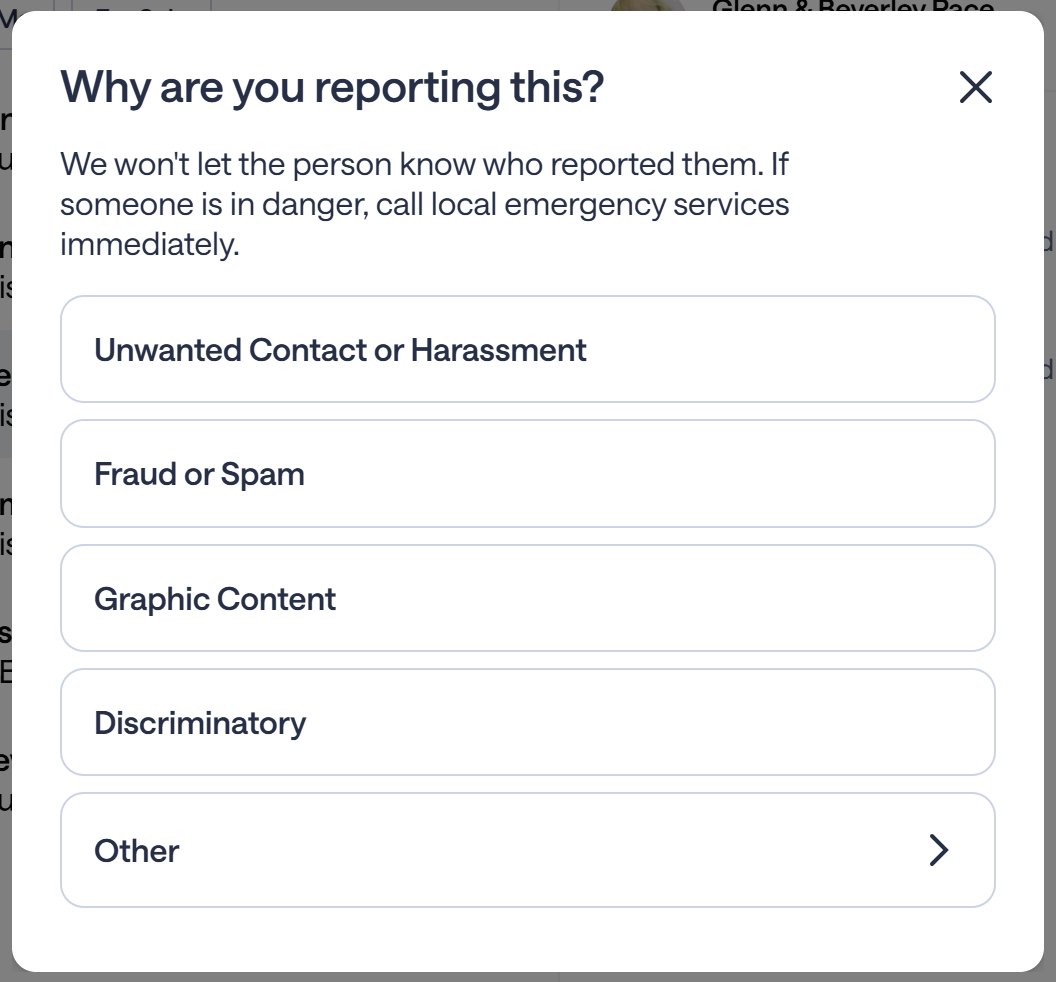
Nextdoor gave me an obvious way to report the suspicious conversation. I selected the deleted message that I believed was associated with the phishing attempt and chose Fraud or Spam. That part was easy.
The problem was what happened next. The report was anonymous, I received no case number, and although the “Other” option allowed me to add explanatory text, there was no obvious way to attach the malicious URL, screenshots of the phishing site, browser history, or other evidence I had collected. That mattered because I was not even certain I had selected the correct deleted conversation, and I wanted a way to explain that uncertainty while providing the supporting material that could help Nextdoor identify the actual phishing message.
From one perspective, the reporting mechanism worked perfectly: I clicked “Report,” and the system accepted a report. From another perspective, a potentially valuable security signal had been reduced to little more than, “Someone thinks this message might be fraud.”
Those are very different outcomes.
Moderation and Security Incident Reporting Are Not the Same Thing
This may partly be a category problem. Platforms need easy mechanisms for handling enormous quantities of routine abuse: spam, harassment, fake accounts, offensive content, Marketplace scams, and inappropriate messages. For many of those situations, an anonymous one-click report is exactly what you want. A user should not need to open a support ticket every time someone sends unwanted spam.
But not every report is merely a moderation issue. Sometimes the user is trying to say something much more consequential: I think somebody is actively impersonating your company, using your platform to distribute the lure, and directing users to an external site designed to collect financial information.
That kind of report contains potentially useful threat intelligence. The organization may want the complete URL, screenshots, browser and message timestamps, sender information, the sequence of events, whether information was entered, and whether the reporter is available for follow-up. An abuse-report button and a security-incident intake mechanism solve related but different problems, and a mature system should probably support both.
Then I Tried to Find the Security Door
Because the in-app report could not carry the full context, I looked for another route. Nextdoor’s support site uses a category-driven process in which the user selects what kind of problem they are having and works through the available forms. That makes sense for customer support, but it becomes less useful when the person reporting the problem does not know how the company categorizes the incident internally.
Was this fraud? Account security? Marketplace abuse? Trust and Safety? Phishing? A compromised account? Brand impersonation? Product security? Something else?
I should not need to know Nextdoor’s organization chart to report an attack against Nextdoor users.
Eventually, I found a published security email address. That seemed like exactly the right place to send the detailed incident report, so I submitted the timeline, phishing details, URL, questions, and information about the evidence I had preserved.
The message reached an Atlassian service-management system. The response said my request could not be created.
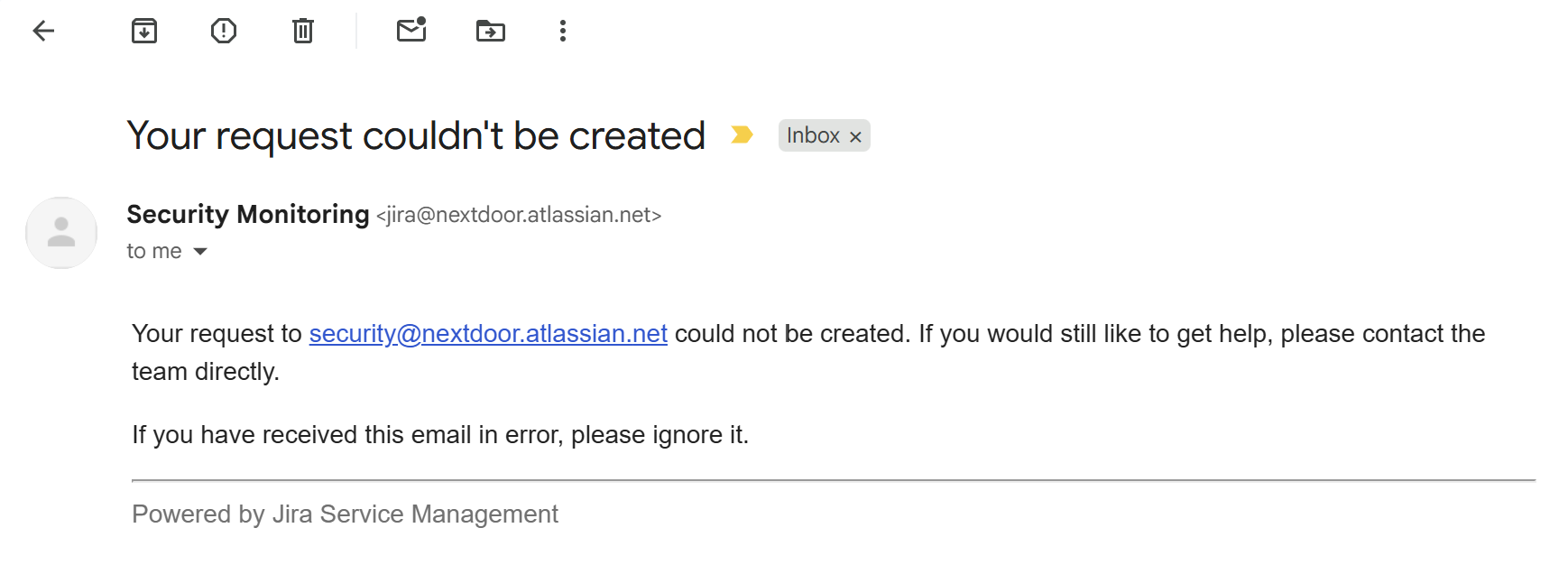
That is an interesting failure mode because everything can appear to be functioning. A company can have a published security contact. The email address can technically receive mail. An automated system can technically respond. Yet the reporting path can still fail to accept the report.
This Is Not About Whether Nextdoor Eventually Responded
It is important to distinguish reporting friction from outright inaction. Nextdoor did eventually acknowledge my report through Support, and in connection with the original incident it told me that it had reviewed the activity and taken appropriate action on the account involved. So the point here is not that Nextdoor ignored the incident.
The more interesting question is how much effort a reporter should have to expend before useful security information reaches the organization.
In my case, I used the in-app fraud-reporting mechanism, the published security address, the regular support process, the press address after the security route failed, and direct outreach intended to make sure the issue reached the appropriate team. I was unusually motivated. I was documenting the incident, I have a technology background, I understood why the URL and timing could matter, and I was willing to keep trying.
The average victim may not do any of that. They may click “Report” once and move on. If that report cannot carry enough context or disappears into a process that provides no visible acknowledgment, potentially useful information may never become actionable.
That is where reporting friction becomes a security problem.
Humans Are Part of Your Detection Network
Security teams collect enormous amounts of telemetry: authentication events, network logs, endpoint signals, fraud scores, behavioral analytics, email reputation, domain intelligence, and threat feeds. Even when automated systems have already detected suspicious activity, users can provide something those systems may not have: context.
I could tell Nextdoor that I posted several For Sale listings and almost immediately received a message claiming that those listings had been suspended. I could point out that the message directed me to a domain that was not owned by Nextdoor, that the destination reproduced Nextdoor’s branding while inventing a payment-card verification process, and that the original message later disappeared.
Each of those observations is useful on its own. Together, they form a pattern.
A human being had connected several events into a security signal. That makes the user a sensor, and the reporting mechanism becomes the channel carrying that sensor data. If the channel strips away most of the context, cannot accept supporting evidence, or fails to reach the right team, the organization has degraded its own telemetry.
Think About Security Intake as a Pipeline
One way to evaluate a reporting system is to stop thinking about it as a support form and start thinking about it as a data pipeline. One important input to that pipeline begins when someone outside the security team notices something suspicious and ends when somebody capable of taking the appropriate action has enough information to evaluate it.
Several things can go wrong between those two points. Signal loss occurs when the reporter knows something important but the reporting mechanism does not ask for it. Context loss happens when the organization receives the suspicious message but not the explanation of why the reporter thinks it matters. Evidence loss occurs when screenshots, URLs, timestamps, or other supporting material cannot be attached.
Routing failure sends the report to the wrong team. Acknowledgment failure leaves the reporter uncertain whether anyone received it. Correlation failure allows multiple users to report pieces of the same attack without those reports ever being associated with one another. Reporter abandonment happens when the process requires enough work that the person simply gives up.
None of these failures is as dramatic as a zero-day vulnerability. But every one of them can increase the amount of time an attack remains active.
The Reporter Should Get a Receipt
One of the simplest improvements is also one of the least glamorous: give the reporter a case number.
Something as basic as:
Security/Fraud Report #SR-13875 received.
does several useful things. It tells the user that the information entered the system, gives support and security teams something to reference, and provides a way to attach additional evidence later. It also makes it possible for someone to say, “I found another screenshot related to SR-13875,” or, “The domain from SR-13875 has changed.”
Without a reference number, each follow-up risks becoming a new and disconnected interaction.
Preserve the Evidence Even When You Remove the Content
My own mistake in this incident was failing to immediately capture the original phishing message. By the following day, it was gone from my view. But that also raises a product-design question: when a platform removes suspected malicious content, what happens to the underlying evidence?
Ideally, moderation and preservation happen together. A malicious message may need to disappear from user-facing interfaces immediately, but that does not mean it should disappear from the organization’s incident history. The internal record may be useful for determining who sent it, who received it, who opened it, which URLs it contained, whether similar messages were sent, whether notifications were generated, and whether other accounts were involved.
The security objective is therefore not simply to remove malicious content. It is to remove the content from users while preserving enough evidence to investigate what happened.
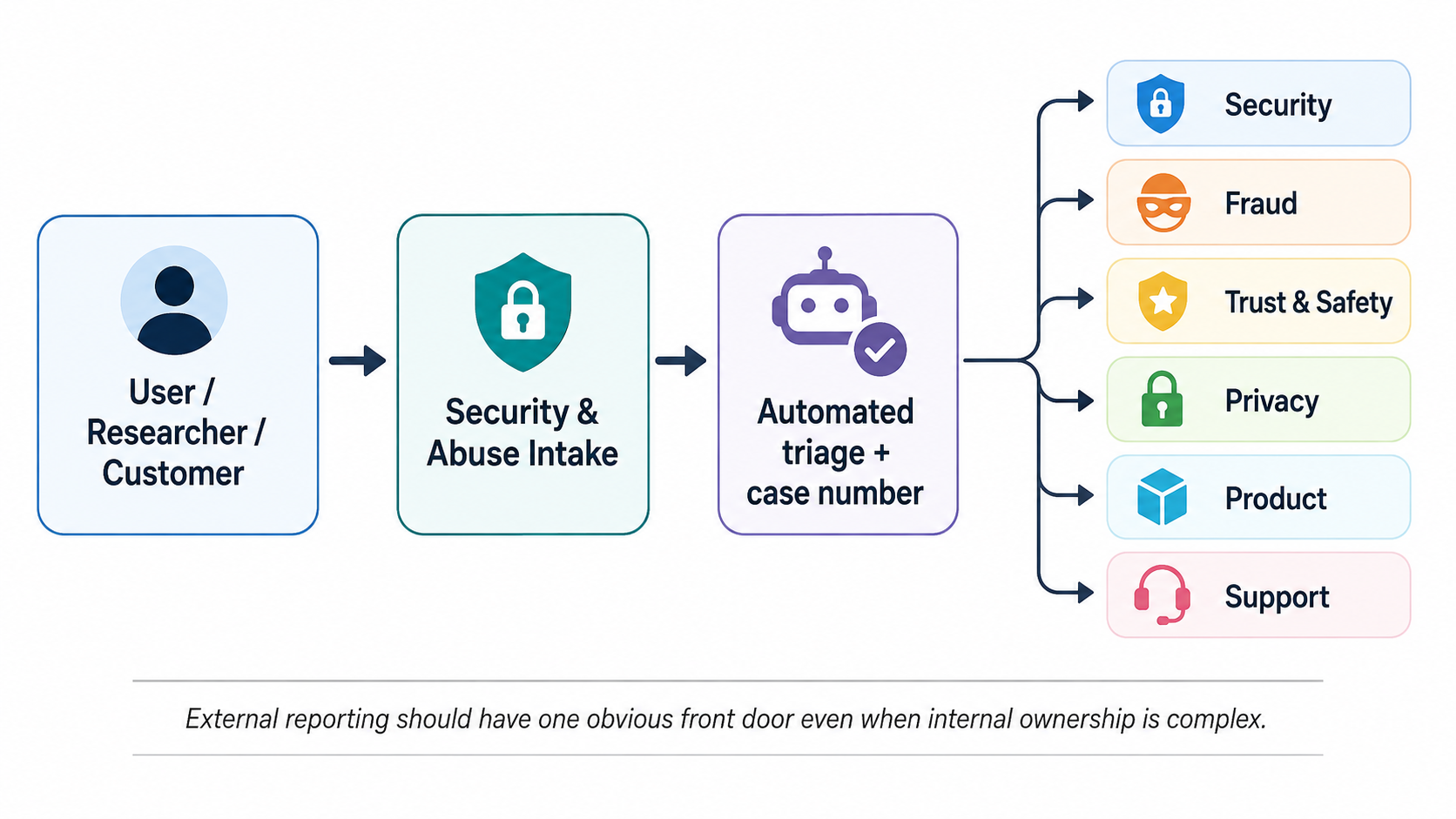
One Front Door, Many Internal Destinations
Organizations understandably have specialized teams for Security, Trust and Safety, Fraud, Privacy, Legal, Product, Abuse, Support, and Communications. The customer should not have to route among them.
A better model is a single external front door with intelligent internal routing. The external question should be, “What happened?” The internal question should be, “Who owns this?”
Those questions should not be reversed.
A security.txt File Is Useful. But It Is Not the Control.
There is actually an Internet convention intended to solve part of the problem of finding the right security contact. It is called security.txt.
Defined in RFC 9116, a security.txt file is a small, machine-readable text file that an organization publishes at a standardized location on its website: https://example.com/.well-known/security.txt. The /.well-known/ location is part of the specification, making it possible for people and automated tools to know where to look for an organization’s security-reporting information. Its purpose is to make it easier for security researchers and others who discover vulnerabilities to determine how an organization wants those issues reported. The file can identify a security email address or reporting page and can also include or point to disclosure policies, encryption information, preferred languages, and other instructions.
It is a simple idea. Instead of someone discovering a security problem and then searching a corporate website, guessing email addresses, or trying to determine whether Support, Legal, Security, or some other team owns the issue, they can check a standard location for instructions.
There is an important distinction in this case. The security.txt specification was created primarily to help with vulnerability disclosure, and the RFC specifically distinguishes that from incident response involving things such as compromised websites or network intrusions. It also says that security.txt is intended to complement, rather than replace, an organization’s other public security-reporting resources.
My phishing report was not a conventional vulnerability disclosure. I had not discovered a flaw in Nextdoor’s software. I was reporting apparent abuse of the platform and Nextdoor’s brand. Still, when the normal reporting path did not give me an obvious way to submit the complete evidence, finding a published security contact was a reasonable next place to turn.
And that leads to the larger point.
Publishing a security.txt file is good practice, but the file and the email address inside it are not themselves the security control. The entire path behind them is the control.
Does the mailbox work? Can an outside sender reach it? Can supporting evidence be submitted safely? Does a message create a case? Who owns the resulting queue? How quickly is it triaged? If the report actually belongs with Fraud or Trust and Safety rather than Product Security, does someone route it there? What happens if the ticketing system rejects the message? Is somebody monitoring those failures? Does the sender receive a meaningful acknowledgment?
A well-documented security contact that ultimately feeds a broken or poorly routed workflow can provide the appearance of accessibility without providing reliable intake.
Security teams routinely test firewalls, backups, authentication systems, and disaster-recovery procedures. Security-reporting channels deserve testing too.
Send a report through your own published process and see where it actually goes.
Measure the Reporting System
If reporting is a security control, it can be measured like one.
An organization could track time to acknowledgment, time to human triage, time to containment, routing accuracy, reporter abandonment, evidence-completion rates, and the ability to correlate duplicate reports involving the same account, URL, domain, or campaign.
Those numbers will not tell you everything, but they tell you far more than simply counting how many times users clicked “Report.”
A process can look successful because reports are being submitted while still failing to move useful information efficiently.
There Are Real Tradeoffs
Making security reporting easy is not the same as accepting everything unfiltered. Open security channels attract spam, automated submissions, duplicate reports, angry customers using the wrong channel, low-quality vulnerability claims, extortion attempts, malicious attachments, and attackers probing the company’s response process.
Security teams therefore have legitimate reasons to structure and automate intake. There are also privacy considerations. A reporter may want to remain anonymous, and a Trust and Safety team may need to protect the identity of someone who reported another user. A security team also cannot necessarily disclose details about an active investigation.
Sometimes the appropriate response may simply be:
We received the information and have routed it to the appropriate team.
That is still better than uncertainty.
The objective should not be to eliminate all friction. The objective should be to ensure that the friction serves an actual security purpose.
Ask What Every Step Is Protecting
This may be the simplest design test. For every obstacle in the reporting workflow, ask: What security problem does this step solve?
If a CAPTCHA reduces automated spam, that may be worthwhile. If attachment restrictions reduce malware risk, provide a secure alternative. If anonymous reporting protects users, also offer an optional authenticated path for people with evidence. If categories improve routing, include an “I’m not sure / security concern” option. If a support system prevents direct email submission, make sure the published security contact points somewhere that actually accepts reports.
Friction is sometimes necessary.
Unexplained friction is just loss.
Treat the Person Reporting the Problem as an Asset
There is also a cultural component. The person reporting suspicious activity is not necessarily a professional security researcher. They may be a customer, employee, vendor, parent, seller, or simply someone who noticed that something felt wrong.
They may use the wrong terminology. They may misunderstand part of what happened. They may submit incomplete evidence. They may even initially report the wrong message, which is precisely what I may have done after the original phishing message disappeared.
That does not make the signal worthless.
Good incident intake separates uncertainty from irrelevance. A report can contain imperfect information and still point toward a real attack.
I Would Rather Receive Ten Imperfect Reports Than Miss the Important One
There is obviously a cost to triage, but the goal should not be to design a reporting process so restrictive that only experts can navigate it successfully.
The best reporter may be someone who cannot explain exactly why something is wrong. They just know it is.
That intuition is often how social engineering is detected. The logo looks right. The message sounds official. The timing makes sense. But something does not fit.
Security organizations spend significant amounts of money building systems capable of detecting anomalies. Sometimes a customer has independently noticed the same anomaly – and can add context that automated detection alone may not provide.
Make it easy for them to tell you.
The Bigger Lesson
The phishing campaign I encountered was the obvious security event. The reporting process revealed something less obvious.
Security is not only about preventing attackers from getting in. It is also about making sure information about attacks can get in — into the right queue, with enough context, with the evidence intact, with a way to correlate it with other reports, and with enough acknowledgment that the person who discovered the problem knows their effort was not wasted.
A “Report Fraud” button is part of that system. So is a support form. So is a published security email address. So is the ticketing platform behind that address, and so is the employee or automation responsible for routing the report.
Taken together, those are not merely customer-support conveniences.
They are security controls.
Organizations should design, test, and measure them accordingly.
This article describes my experience reporting a phishing attempt involving Nextdoor. Nextdoor ultimately acknowledged my report and told me that it had reviewed the activity associated with the original incident. My criticism here is not that the company ignored the issue. It is that the reporter-visible path for providing complete security information was fragmented enough to illustrate a broader problem that applies to many organizations.
Next in the series: Part 3 examines a surprisingly difficult problem with abuse reporting: what happens when submitting the exact phishing URL needed to shut down a scam may also tell the suspected scammer exactly which victim reported them?
When Your Brand Becomes the Bait
- Part 1: A Fake Nextdoor Page Asked for My Credit Card. What Should Happen Next?
- Part 2: Security Reporting Is a Security Control. Treat It Like One.
- Part 3: When Reporting a Phishing URL May Identify the Victim